
images.AutoOrient
Returns an image filter that rotates and flips an image as needed per its Exif orientation tag.
- Syntax
- images.AutoOrient
- Returns
- images.filter
Usage
The images.AutoOrient function returns an image filter that rotates and flips an image as needed per its Exif orientation tag. When you combine this filter with other filters, specify it first.
Examples
{{ $filter := images.AutoOrient }}Applying the filter with the images.Filter function:
{{ with resources.Get "images/original.jpg" }}
  {{ with . | images.Filter $filter }}
    <img src="{{ .RelPermalink }}" width="{{ .Width }}" height="{{ .Height }}" alt="">
  {{ end }}
{{ end }}
Applying the filter with the Filter method on a Resource object:
{{ with resources.Get "images/original.jpg" }}
  {{ with .Filter $filter }}
    <img src="{{ .RelPermalink }}" width="{{ .Width }}" height="{{ .Height }}" alt="">
  {{ end }}
{{ end }}
This is the original image:
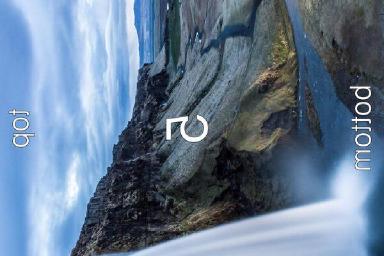
This is the processed image:

Combining with other filters:
{{ $filters := slice
  images.AutoOrient
  (images.Process "resize 200x")
}}
{{ with resources.Get "images/original.jpg" }}
  {{ with images.Filter $filters . }}
    <img src="{{ .RelPermalink }}" width="{{ .Width }}" height="{{ .Height }}" alt="">
  {{ end }}
{{ end }}
Last updated:
November 17, 2026
:
content: Apply style guide to images functions (e302e964f)
Improve this page