
images.Dither
Returns an image filter that dithers an image.
- Syntax
- images.Dither [OPTIONS]
- Returns
- images.filter
Usage
The images.Dither function returns an image filter that dithers an image.
Follow these recommendations to get the best results with any dithering method:
- If you resize the image, do so before dithering it. Resizing a dithered image distorts the dither pattern.
- If the dithering palette is grayscale, convert the image to grayscale before dithering it.
- Convert the dithered image to a lossless format such as GIF or PNG.
Arguments
OPTIONS- (
map) See options.
Options
The images.Dither function accepts an options map.
colors- (
slice) A slice of two or more colors that make up the dithering palette, each expressed as an RGB or RGBA hexadecimal color, with or without a leading hash mark. Default is opaque black (000000ff) and opaque white (ffffffff). method- (
string) The dithering method. Default isFloydSteinberg. The documentation for themakeworld-the-better-one/ditherpackage describes each of these dithering methods.Use one of these error diffusion dithering methods:
AtkinsonBurkesFalseFloydSteinbergFloydSteinbergJarvisJudiceNinkeSierraSierra2Sierra2_4ASierra3SierraLiteSimple2DStevenPigeonStuckiTwoRowSierra
Or use one of these ordered dithering methods:
ClusteredDot4x4ClusteredDot6x6ClusteredDot6x6_2ClusteredDot6x6_3ClusteredDot8x8ClusteredDotDiagonal16x16ClusteredDotDiagonal6x6ClusteredDotDiagonal8x8ClusteredDotDiagonal8x8_2ClusteredDotDiagonal8x8_3ClusteredDotHorizontalLineClusteredDotSpiral5x5ClusteredDotVerticalLineHorizontal3x5Vertical5x3
serpentine- (
bool) Applicable to error diffusion dithering methods, whether to process every other row from right to left instead of from left to right. This reduces streaks in the dither pattern. Default istrue. strength- (
float) How strongly to apply the dither pattern, typically in the range[0, 1]. A lower value produces fewer scattered dots and more contrast, so a value such as0.8can reduce noise in the dithered image. Default is1.0.
Examples
{{ $filter := images.Dither }}Applying the filter with the images.Filter function:
{{ with resources.Get "images/original.jpg" }}
  {{ with . | images.Filter $filter }}
    <img src="{{ .RelPermalink }}" width="{{ .Width }}" height="{{ .Height }}" alt="">
  {{ end }}
{{ end }}
Applying the filter with the Filter method on a Resource object:
{{ with resources.Get "images/original.jpg" }}
  {{ with .Filter $filter }}
    <img src="{{ .RelPermalink }}" width="{{ .Width }}" height="{{ .Height }}" alt="">
  {{ end }}
{{ end }}
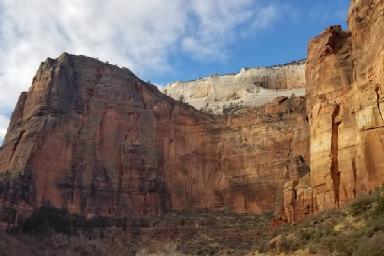
This is the original image:
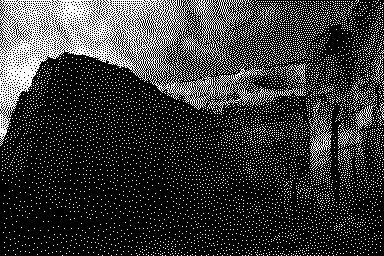
This is the processed image:
With options:
{{ $opts := dict
  "colors" (slice "222222" "808080" "dddddd")
  "method" "ClusteredDot4x4"
  "strength" 0.85
}}
{{ $filter := images.Dither $opts }}
Resizing the image, dithering it with the three most dominant colors in the image, and converting it to PNG:
{{ with resources.Get "images/original.jpg" }}
  {{ $opts := dict
    "method" "ClusteredDotSpiral5x5"
    "colors" (first 3 .Colors)
  }}
  {{ $filters := slice
    (images.Process "resize 800x")
    (images.Dither $opts)
    (images.Process "png")
  }}
  {{ with . | images.Filter $filters }}
    <img src="{{ .RelPermalink }}" width="{{ .Width }}" height="{{ .Height }}" alt="">
  {{ end }}
{{ end }}
Resizing the image, converting it to grayscale, dithering it with a grayscale palette, and converting it to PNG:
{{ with resources.Get "images/original.jpg" }}
  {{ $opts := dict "colors" (slice "222" "808080" "ddd") }}
  {{ $filters := slice
    (images.Process "resize 800x")
    images.Grayscale
    (images.Dither $opts)
    (images.Process "png")
  }}
  {{ with . | images.Filter $filters }}
    <img src="{{ .RelPermalink }}" width="{{ .Width }}" height="{{ .Height }}" alt="">
  {{ end }}
{{ end }}
Last updated:
November 17, 2026
:
content: Apply style guide to images functions (e302e964f)
Improve this page