
images.Mask
- Syntax
- images.Mask RESOURCE
- Returns
- images.filter
Usage
The images.Mask function returns an image filter that applies a mask to an image. The RESOURCE argument is the mask image, which can be a global resource, a page resource, or a remote resource.
Black pixels in the mask make the corresponding areas of the image transparent, and white pixels keep them opaque. Hugo converts a color mask to grayscale, and resizes the mask to match the dimensions of the image.
Of the formats that Hugo can process, only AVIF, PNG, and WebP support transparency. To make the masked areas transparent, convert the image to one of these formats. Otherwise, Hugo fills the masked areas with the bgColor setting in your imaging configuration. To use a different color, combine this filter with an images.Process filter that specifies a background color.
Examples
{{ $filter := images.Mask (resources.Get "images/mask.png") }}Applying the filter with the images.Filter function:
{{ with resources.Get "images/original.jpg" }}
  {{ with . | images.Filter $filter }}
    <img src="{{ .RelPermalink }}" width="{{ .Width }}" height="{{ .Height }}" alt="">
  {{ end }}
{{ end }}
Applying the filter with the Filter method on a Resource object:
{{ with resources.Get "images/original.jpg" }}
  {{ with .Filter $filter }}
    <img src="{{ .RelPermalink }}" width="{{ .Width }}" height="{{ .Height }}" alt="">
  {{ end }}
{{ end }}
This is the mask image:

This is the original image:

This is the processed image:
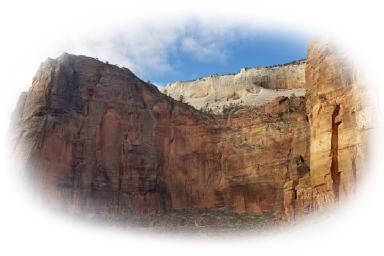
Converting the image to WebP to make the masked areas transparent:
{{ $filters := slice
  (images.Process "webp")
  (images.Mask (resources.Get "images/mask.png"))
}}
Filling the masked areas with a background color:
{{ $filters := slice
  (images.Process "#00ff00")
  (images.Mask (resources.Get "images/mask.png"))
}}