
images.Overlay
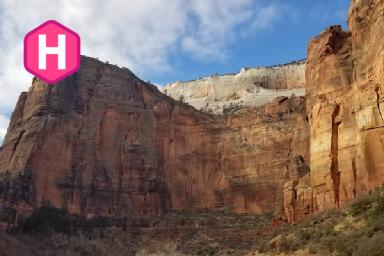
Returns an image filter that overlays the given image at the given coordinates, relative to the upper-left corner.
- Syntax
- images.Overlay RESOURCE X Y
- Returns
- images.filter
Usage
The images.Overlay function returns an image filter that overlays the given image at the given coordinates. The base image is the image to which you apply the filter, and the coordinates are relative to its upper-left corner. The filter does not change the dimensions of the base image, so it crops any part of the overlay that extends beyond the edges.
Arguments
RESOURCE- (
resource.Resource) The image to overlay, which can be a global resource, a page resource, or a remote resource. X- (
int) The horizontal offset of the overlay’s left edge, in pixels, relative to the left edge of the base image. Use a negative value to position part of the overlay beyond the left edge. Y- (
int) The vertical offset of the overlay’s top edge, in pixels, relative to the top edge of the base image. Use a negative value to position part of the overlay beyond the top edge.
Examples
{{ $overlay := "" }}
{{ $path := "images/logo.png" }}
{{ with resources.Get $path }}
  {{ $overlay = . }}
{{ else }}
  {{ errorf "Unable to get resource %q" $path }}
{{ end }}

{{ $filter := images.Overlay $overlay 20 20 }}
Applying the filter with the images.Filter function:
{{ with resources.Get "images/original.jpg" }}
  {{ with . | images.Filter $filter }}
    <img src="{{ .RelPermalink }}" width="{{ .Width }}" height="{{ .Height }}" alt="">
  {{ end }}
{{ end }}
Applying the filter with the Filter method on a Resource object:
{{ with resources.Get "images/original.jpg" }}
  {{ with .Filter $filter }}
    <img src="{{ .RelPermalink }}" width="{{ .Width }}" height="{{ .Height }}" alt="">
  {{ end }}
{{ end }}
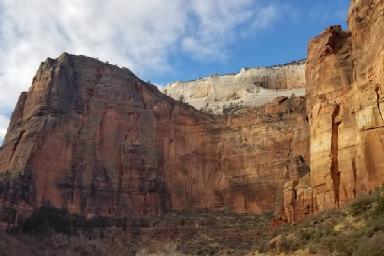
This is the original image:
This is the processed image:
Last updated:
November 17, 2026
:
content: Apply style guide to images functions (e302e964f)
Improve this page