
images.Text
Returns an image filter that adds text to an image.
- Syntax
- images.Text TEXT [OPTIONS]
- Returns
- images.filter
Usage
The images.Text function returns an image filter that adds text to an image. Hugo wraps the text to fit within the image, and starts a new line at each newline character.
Arguments
TEXT- (
string) The text to add to the image. OPTIONS- (
map) See options.
Options
The images.Text function accepts an options map. None of the options are required, but you should set the size to a reasonable percentage of the image height.
alignx- New in v0.141.0
- (
string) The horizontal alignment of the text relative to the horizontal offset, one ofleft,center, orright. Default isleft. aligny- New in v0.147.0
- (
string) The vertical alignment of the text relative to the vertical offset, one oftop,center, orbottom. Default istop. color- (
string) The font color, expressed as an RGB or RGBA hexadecimal color, with or without a leading hash mark. Default is#ffffff(white). font- (
resource.Resource) The font, which can be a global resource, a page resource, or a remote resource. Default is Go Regular, a proportional sans-serif TrueType font. linespacing- (
int) The extra space between lines, in pixels, added to the height of each line. To set a line height that is proportional to the font size, multiply thesizeby one less than the line height. For example, for a line height of 1.4 and asizeof40, set thelinespacingto16. Default is2. size- (
int) The font size, in pixels. Default is20. x- (
int) The horizontal offset, in pixels, relative to the left edge of the image. Default is10. y- (
int) The vertical offset, in pixels, relative to the top edge of the image. Default is10.
Examples
{{ $opts := dict
  "color" "#fbfaf5"
  "linespacing" 8
  "size" 40
  "x" 25
  "y" 190
}}
{{ $filter := images.Text "Zion National Park" $opts }}
Applying the filter with the images.Filter function:
{{ with resources.Get "images/original.jpg" }}
  {{ with . | images.Filter $filter }}
    <img src="{{ .RelPermalink }}" width="{{ .Width }}" height="{{ .Height }}" alt="">
  {{ end }}
{{ end }}
Applying the filter with the Filter method on a Resource object:
{{ with resources.Get "images/original.jpg" }}
  {{ with .Filter $filter }}
    <img src="{{ .RelPermalink }}" width="{{ .Width }}" height="{{ .Height }}" alt="">
  {{ end }}
{{ end }}
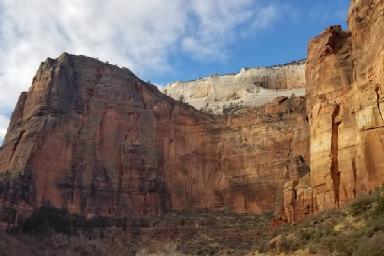
This is the original image:
This is the processed image:

Using a remote font, and centering the text horizontally and vertically:
{{ $text := "Zion National Park" }}
{{ $fontPath := "https://github.com/google/fonts/raw/main/ofl/lato/Lato-Regular.ttf" }}
{{ $imagePath := "images/original.jpg" }}

{{ $font := "" }}
{{ with try (resources.GetRemote $fontPath) }}
  {{ with .Err }}
    {{ errorf "%s" . }}
  {{ else with .Value }}
    {{ $font = . }}
  {{ else }}
    {{ errorf "Unable to get resource %s" $fontPath }}
  {{ end }}
{{ end }}

{{ with resources.Get $imagePath }}
  {{ $opts := dict
    "alignx" "center"
    "aligny" "center"
    "color" "#fbfaf5"
    "font" $font
    "linespacing" 8
    "size" 60
    "x" (mul .Width 0.5 | int)
    "y" (mul .Height 0.5 | int)
  }}
  {{ with . | images.Filter (images.Text $text $opts) }}
    <img src="{{ .RelPermalink }}" width="{{ .Width }}" height="{{ .Height }}" alt="">
  {{ end }}
{{ else }}
  {{ errorf "Unable to get resource %s" $imagePath }}
{{ end }}
Last updated:
November 17, 2026
:
content: Apply style guide to images functions (e302e964f)
Improve this page